WAZE · INSTRUMENT CLUSTER · BYD
Waze on your BYD cluster,
right in front of the wheel.
DashArc brings Waze navigation via Android Auto to your BYD’s instrument cluster, with turn-by-turn directions and lane guidance. Your next turn stays in your line of sight, without mirroring your phone, and the head unit stays free for music or your passenger.
To see how a cluster map differs from a head unit map, read the BYD instrument cluster map guide.
Also on the cluster: CarPlay, Android Auto, speed camera alerts and maneuvering cameras.
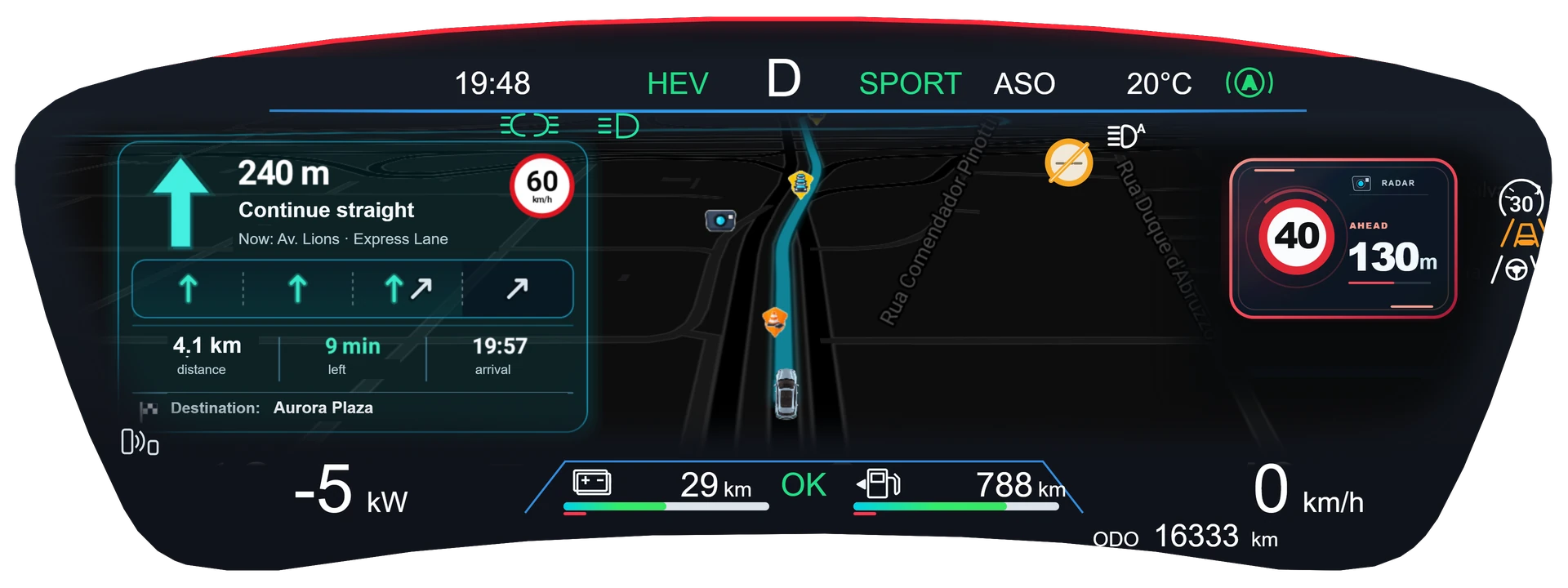
What shows on the cluster
- Map with the route, next turn and lane guidance.
- Speed camera and police alerts along the route.
- Map themes and an editor for colors, road width, label size, buildings and route style.
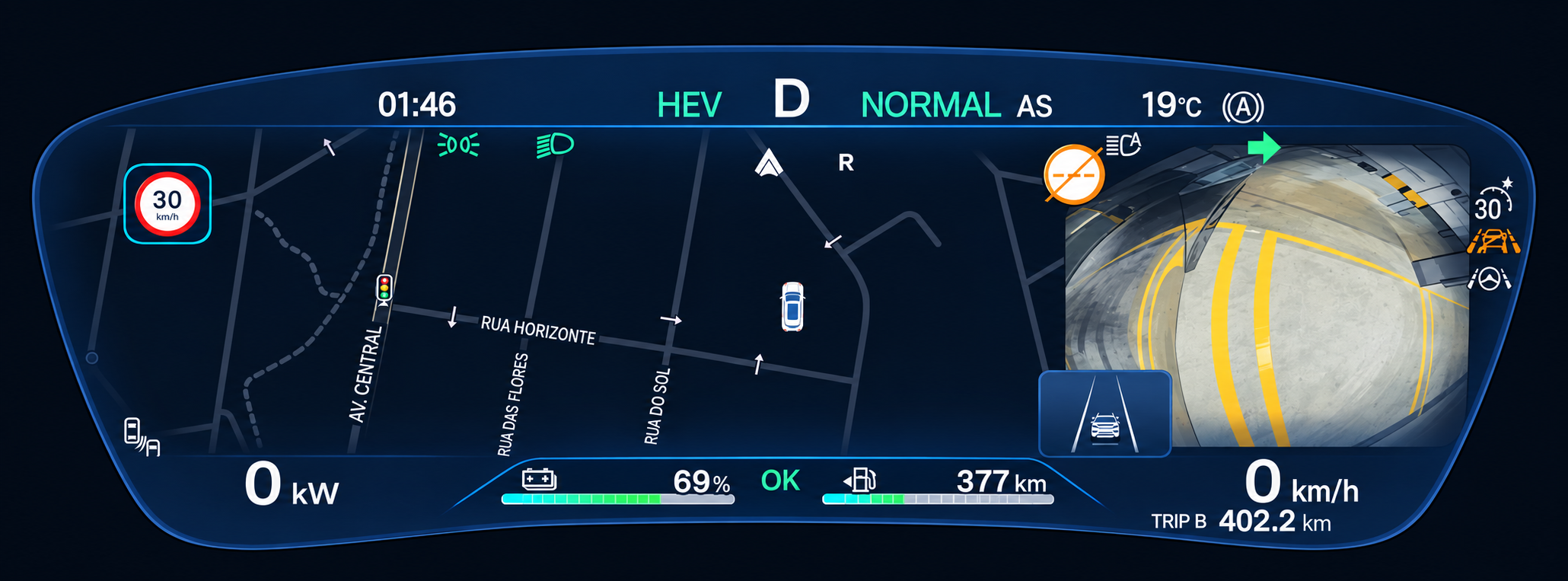
Maneuvering cameras on the cluster
The rear camera and side cameras appear on the instrument cluster. The side camera pops up when you use the turn signal, to check your blind spot. Camera position, size and shape are adjustable.
Android Auto and CarPlay
With Android Auto or CarPlay, the Waze map and turn-by-turn guidance appear on the instrument cluster.
Frequently asked questions
Can I put Waze on my BYD cluster without mirroring my phone?
Yes. DashArc draws the route on the instrument cluster from Android Auto navigation, with no mirroring.
Does it work with Google Maps?
DashArc follows Android Auto navigation apps; the main tested integration is with Waze.
Does it work on the BYD Dolphin, Atto 3, Seal and others?
DashArc targets BYD cars with a DiLink head unit and has been tested on DiLink 3 head units on the 13.1.33 family. See the models in the cluster map guide.
Tested on DiLink 3 head units running the 13.1.33 system family. Not every feature may be available on your vehicle; features depend on the head unit, firmware and model.
DashArc is an independent app. References to BYD, Waze and Android Auto identify the vehicle platform and integrations; they do not imply partnership or endorsement.
More DashArc features
- YouTube, Netflix, WhatsApp and more apps on the BYD head unit — install YouTube, Netflix, Prime Video, WhatsApp, Instagram and any Google Play app from the DashArc store.
- BYD live cameras on your phone — watch the car’s 360° cameras live on your phone, with audio, even while the car is off.
- BYD dashcam and sentry mode — record all four car cameras in a single video, driving or parked, to an SD card, USB drive or the head unit.
- Full BYD telemetry on your phone — 100+ vehicle data points in real time: battery, battery health, fuel, 12 V, tires, power, consumption and more.
- BYD dashcam: the most advanced recording system — all 4 car cameras (plus a USB camera) in a single video, in H.265, with car data and everything on your phone.
- BYD sentry mode — the parked car watched by all 4 cameras, recording to an SD card with the car off and with videos on your phone.
- Dashcam and sentry recordings on your phone — watch, download and protect your BYD videos on your phone, organized by day and linked to each trip.
- Your whole BYD on your phone — car status, live cameras, recordings, commands, telemetry, trips, files and the head unit — all on your phone.
- Start and control your BYD from your phone — start the car and climate, open the trunk, control windows, sunroof, seats and lights from your phone.
- Install apps on the BYD head unit — unlock app installs on the DiLink head unit, use the DashArc store and send APKs from your phone.
- Remote access to the BYD head unit screen — see and control the car’s head unit screen from your phone or computer.
- BYD trip history and telemetry — every trip with a map, distance, real kWh and fuel use, charts and the recordings from that drive.
- BYD head unit wallpaper (even animated) — change the head unit background to your own photo or an animated video, right from your phone.
- BYD automations — routines that react to the car: triggers, actions, waits and conditions, with BYD cloud commands.
- Extra USB camera on your BYD — plug a webcam into the head unit: watch it live on your phone and record it with the car’s 4 cameras.
- BYD head unit file manager — browse the head unit, SD card and USB drive folders from your phone; upload and download files.
- BYD head unit screen lock and valet mode — protect the head unit with a PIN, password or pattern; valet mode; cameras and A/C stay available.
- Speed camera alerts on the BYD cluster — fixed and red-light speed cameras shown on the instrument cluster, with distance and limit.
- CarPlay on the BYD instrument cluster — Apple CarPlay route on the instrument cluster, automatic iPhone connection and speed camera alerts.
- Android Auto on the BYD instrument cluster — Android Auto route on the instrument cluster, with lanes, turns, exits and speed cameras.
- Maneuvering cameras on the BYD cluster — side camera when you signal and reverse cameras on the instrument cluster, without leaving the route.
- What is the best app for BYD? — DashArc brings a free unlocker, an app store with YouTube and Netflix, live cameras, dashcam, Waze on the cluster and phone control into one app.