APP STORE · YOUTUBE · NETFLIX · BYD
YouTube, Netflix and WhatsApp
on your BYD head unit.
The BYD DiLink head unit ships with few apps and no Google Play. DashArc turns it into a full Android tablet: from the DashArc app store you install YouTube, Netflix, Prime Video, Disney+, Spotify, WhatsApp, Instagram, Telegram and any other Google Play app, right on the car’s head unit.
It takes a few steps: the free DashArc Unlocker enables app installs on the head unit; then open the Store, tap Install and use it with the car in use, even while moving.
Any Google Play app, from the DashArc store
The DashArc store lives on the head unit itself (the Store button at the top) and in the phone portal. It includes the Google Play client, which finds and installs the apps you already use on your phone:
- YouTube
- Netflix
- Prime Video
- Disney+
- Max
- Spotify
- YouTube Music
- Deezer
- Telegram
- TikTok
- Waze
- Google Maps
- Twitch
- Install, Update, Open and Uninstall in one tap, on the head unit or your phone.
- The store is open to everyone: no license or trial required.
- You can also send an APK from your phone and the head unit installs it.
Watch with the car in use, even while moving
Apps installed through DashArc work on the head unit while the car is in use, even while moving: passengers watch YouTube, Netflix and Prime Video on the trip, on the BYD’s big screen and through the car’s sound system. Parked, charging or waiting for someone works the same way.
Video, music, messages and social media on the head unit, with no video lock while the car is moving.
How to install YouTube on a BYD head unit
- Unlock the head unit with the free DashArc Unlocker. It completes the BYD verification, enables ADB and installs DashArc.
- Open DashArc on the head unit and tap Store.
- Install the Google Play client and use it to search for YouTube (or Netflix, WhatsApp, Instagram…).
- Tap Install and open the app on the head unit.
Manage head unit apps from your phone
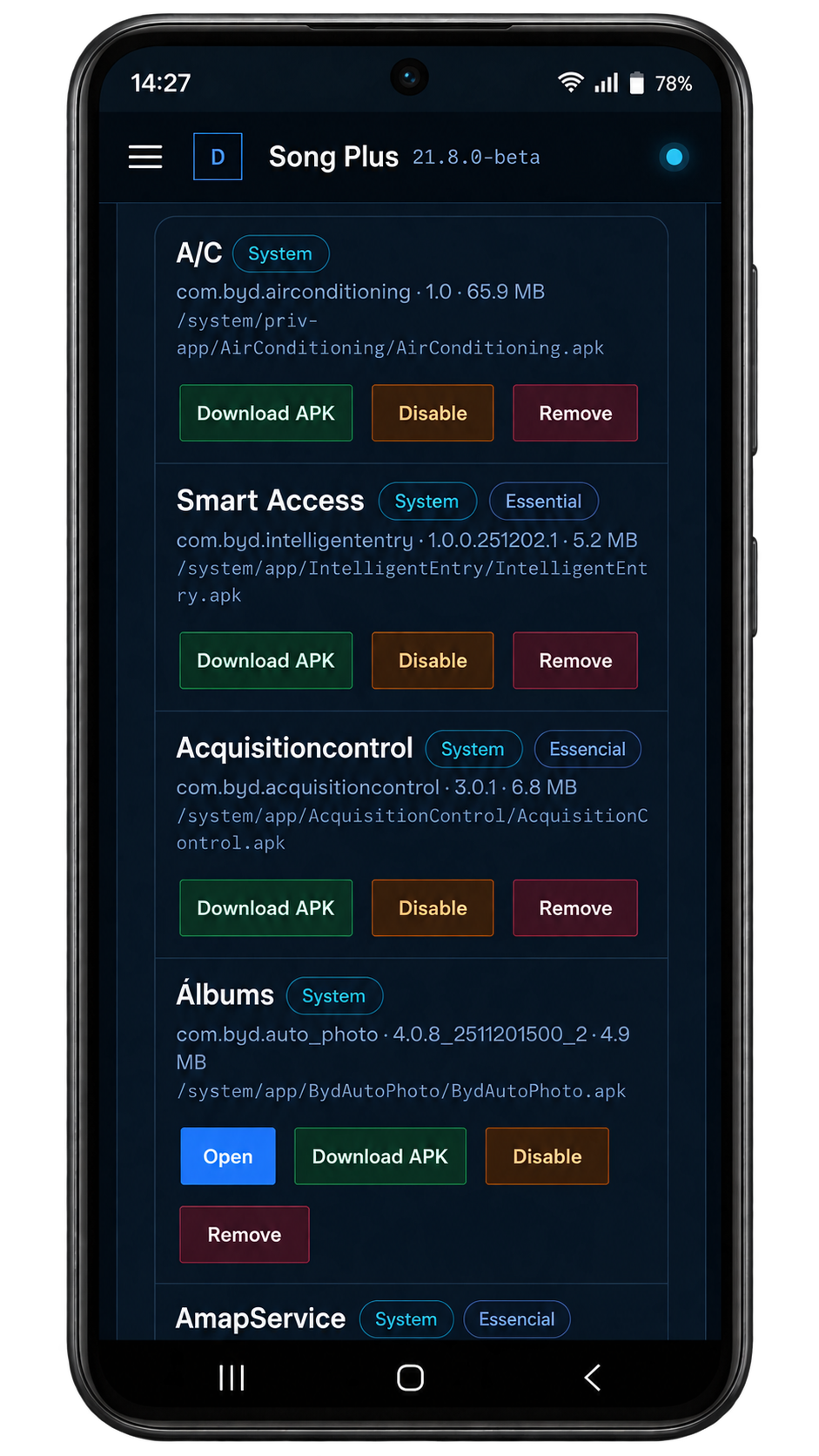
In the DashArc portal, Installed apps lists everything on the head unit: open, update, download the APK, disable or remove apps, including factory apps (with a risk warning). See also how to install apps on a BYD head unit.
Frequently asked questions
How do I get YouTube on my BYD?
Unlock the head unit with the free DashArc Unlocker, open the DashArc store and install YouTube through the Google Play client. A few minutes later YouTube opens on the car’s head unit.
Can I install Netflix, Prime Video and Disney+ on a BYD head unit?
Yes. The DashArc store installs Google Play streaming apps on the DiLink head unit. Some streaming apps may limit video resolution on car head units.
Do WhatsApp and Instagram work on the BYD head unit?
Yes, they install from the DashArc store just like on a phone. WhatsApp can run as a linked device on your account.
Can I watch while the car is in use, while moving?
Yes. Apps work with the car on, parked or moving, so passengers can watch videos, shows and movies on the trip.
Is unlocking the BYD head unit free?
Yes. The DashArc Unlocker is free and the app store is open to everyone. Full DashArc (cameras, dashcam, Waze on the cluster, remote control) has a 30-day free trial and then a one-time lifetime license.
Does it work on the Dolphin, Atto 3, Seal, Song and Yuan?
DashArc targets BYD cars with a DiLink head unit and has been tested on DiLink 3 (system 13.1.33, 2026 models). Results may vary on other head units and model years.
Tested on DiLink 3 head units running the 13.1.33 system family. Not every feature may be available on your vehicle; features depend on the head unit, firmware and model.
DashArc is an independent app. References to BYD, Waze and Android Auto identify the vehicle platform and integrations; they do not imply partnership or endorsement.
More DashArc features
- BYD live cameras on your phone — watch the car’s 360° cameras live on your phone, with audio, even while the car is off.
- BYD dashcam and sentry mode — record all four car cameras in a single video, driving or parked, to an SD card, USB drive or the head unit.
- Start and control your BYD from your phone — start the car and climate, open the trunk, control windows, sunroof, seats and lights from your phone.
- Install apps on the BYD head unit — unlock app installs on the DiLink head unit, use the DashArc store and send APKs from your phone.
- Remote access to the BYD head unit screen — see and control the car’s head unit screen from your phone or computer.
- BYD trip history and telemetry — every trip with a map, distance, real kWh and fuel use, charts and the recordings from that drive.
- Waze on the BYD instrument cluster — Waze turn-by-turn navigation on the display in front of the wheel, with maneuvering cameras and alerts.
- What is the best app for BYD? — DashArc brings a free unlocker, an app store with YouTube and Netflix, live cameras, dashcam, Waze on the cluster and phone control into one app.