LIVE CAMERAS · BYD · PHONE
Your BYD cameras, live,
in the palm of your hand.
With DashArc, your BYD cameras (front, rear and both sides of the 360° view) stream live to your phone or computer. Check on the car in the parking lot, see who is around it, and even listen and talk to whoever is inside.
Everything runs in DashArc on your phone, installed straight from the portal to your home screen, or in a computer browser.
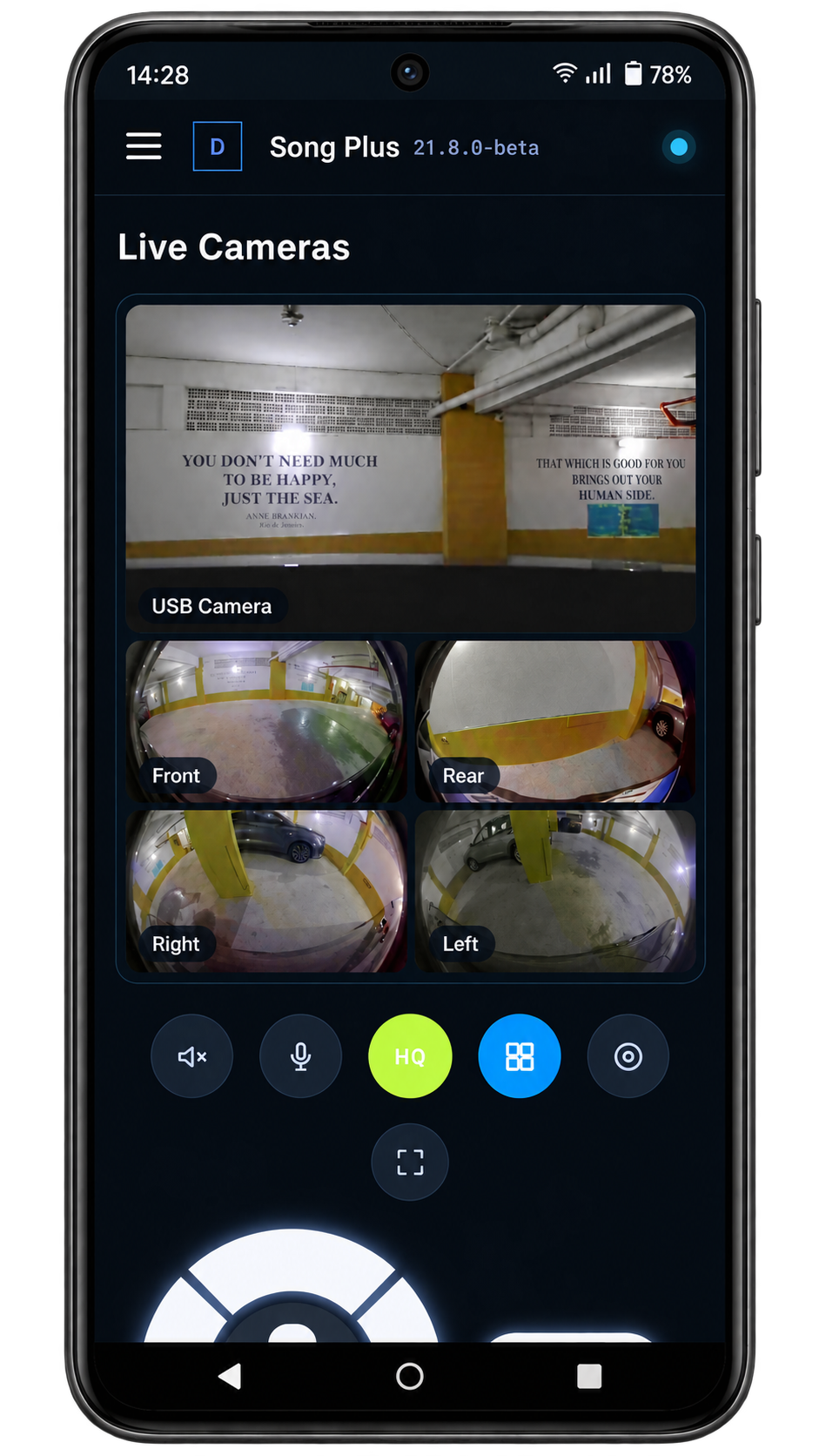
How live cameras work
- One camera fills the screen; two are stacked; three or four show in a 2×2 grid, like BYD’s own four-camera view.
- Full-screen button with a corner menu to pick which cameras to watch.
- On the Current status screen, the camera button opens a quick preview with arrows to switch cameras or show all of them.
- Live cameras keep working even while the factory camera view (reverse, 360°) is open on the head unit.
Remote audio: listen and talk
Right from the live cameras, you can hear what is happening inside the car and talk to whoever is in it from your phone — handy to warn someone near the car or to talk to someone waiting inside.
Live cameras while the car is off
BYD cars shut the head unit down when the vehicle is turned off. DashArc has an optional stay-awake mode that keeps the system and network running with the screen off, so live cameras, the dashcam and sentry mode remain available. It is off by default, and DashArc watches the 12 V battery so it does not drain it.
USB camera alongside the car cameras
Plug a USB camera (a regular webcam) into the head unit: DashArc detects it and shows it live in the portal, with its own buttons next to the camera picker. With one USB camera, the grid shows it full-width on top and the four car cameras below.
Frequently asked questions
How do I watch my BYD cameras on my phone?
Install DashArc on the car’s head unit and sign in to the DashArc portal in your phone browser. DashArc reads the 360° view cameras on the head unit itself and streams them live to the portal.
Does it work while the car is off?
Yes, with DashArc’s stay-awake mode turned on. It is optional and respects a 12 V battery safety limit.
Does the car need internet?
Yes. The head unit needs an internet connection (the car’s SIM, a router or your phone’s hotspot) for the portal to reach the cameras remotely.
Which cameras are available?
The vehicle’s 360° view cameras (front, rear, left and right) and, if present, USB cameras connected to the head unit.
Tested on DiLink 3 head units running the 13.1.33 system family. Not every feature may be available on your vehicle; features depend on the head unit, firmware and model.
DashArc is an independent app. References to BYD, Waze and Android Auto identify the vehicle platform and integrations; they do not imply partnership or endorsement.
More DashArc features
- BYD dashcam and sentry mode — record all four car cameras in a single video, driving or parked, to an SD card, USB drive or the head unit.
- Start and control your BYD from your phone — start the car and climate, open the trunk, control windows, sunroof, seats and lights from your phone.
- Install apps on the BYD head unit — unlock app installs on the DiLink head unit, use the DashArc store and send APKs from your phone.
- Remote access to the BYD head unit screen — see and control the car’s head unit screen from your phone or computer.
- BYD trip history and telemetry — every trip with a map, distance, real kWh and fuel use, charts and the recordings from that drive.
- Waze on the BYD instrument cluster — Waze turn-by-turn navigation on the display in front of the wheel, with maneuvering cameras and alerts.