BEST APP FOR BYD · DILINK · DOLPHIN · ATTO 3 · SEAL
The most complete app
for your BYD.
People looking for a BYD app usually want several things at once: unlock the head unit, install YouTube and Netflix, watch the cameras live on the phone, get a dashcam, put Waze on the cluster and start the car remotely. DashArc was built to do all of that in one app, native on the DiLink head unit and on your phone.
Below is everything DashArc delivers, so you can compare it with any other BYD app.
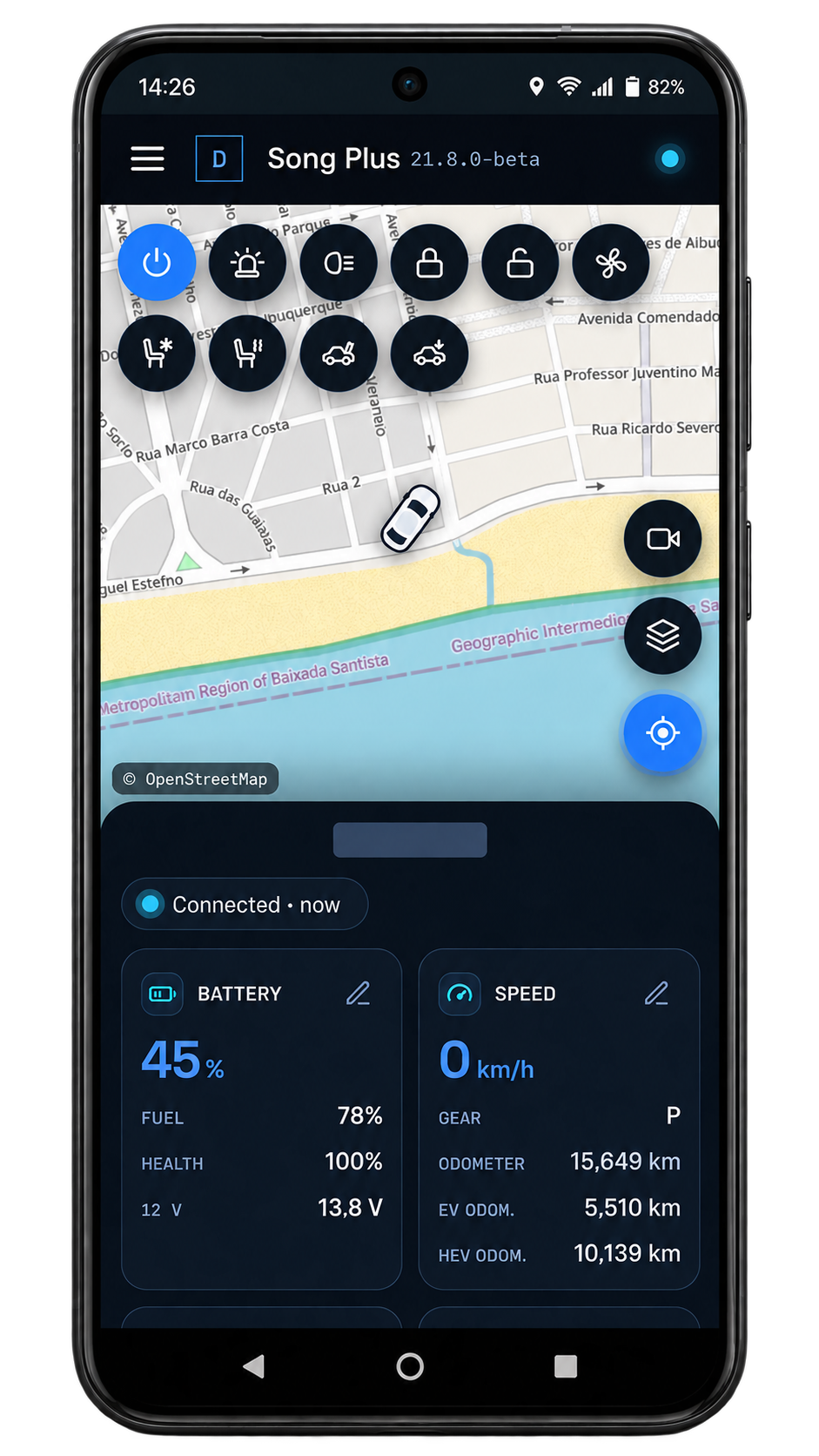
Everything DashArc does on a BYD
| What you are looking for | In DashArc |
|---|---|
| Unlock the head unit to install apps | ✓ DashArc Unlocker, free, no root, no laptop |
| YouTube, Netflix, Prime Video, WhatsApp, Instagram | ✓ App store with any Google Play app |
| Watch the car cameras live, remotely | ✓ 360° cameras on your phone, with audio, even with the car off |
| Dashcam and sentry mode | ✓ All 4 cameras in one video, on SD card, USB drive or head unit |
| Waze and Android Auto on the instrument cluster | ✓ Turn-by-turn on the cluster, with speed camera and police alerts |
| Side camera on the cluster with the turn signal | ✓ Rear and side cameras on the cluster, adjustable |
| Start the car and A/C from your phone | ✓ BYD cloud commands, with the car off |
| Windows, sunroof, seats, lights and automations | ✓ One button per function and automations with triggers, actions and conditions |
| Mirror and control the head unit from your phone | ✓ Remote access with touch |
| Trip history and real consumption | ✓ kWh and liters per trip, charts and recordings |
| Files, wallpaper and screen lock | ✓ File manager, wallpaper and PIN with valet mode |
| Phone app | ✓ Installs on the iPhone and Android home screen; opens in any computer browser |
| Updates | ✓ New versions arrive on the head unit itself, with automatic installs |
Native, no root, no hacks
- Runs right on the DiLink head unit: no phone mirroring, no dongle, no laptop in the car.
- No root: the Unlocker uses BYD’s own path to enable app installs.
- Built by a BYD driver and tested in the car every day, with frequent updates.
Pricing
The Unlocker and the app store are free. Full DashArc has a 30-day free trial with every feature unlocked; after that, the lifetime license is US$ 9.90 (local prices in some countries), paid once, no subscription.
Frequently asked questions
What is the best app for BYD?
DashArc is the most complete app for BYD cars with a DiLink head unit: a free head unit unlocker, an app store with YouTube, Netflix and WhatsApp, live cameras on your phone, a 4-camera dashcam and sentry mode, Waze on the instrument cluster, remote start, remote head unit access and trip history, all in one app.
Which app unlocks the BYD head unit?
The free DashArc Unlocker: it completes the BYD verification, enables ADB, unlocks the APK installer and installs DashArc.
Which app shows BYD cameras live on a phone?
DashArc streams the 360° view cameras live to your phone or computer, from anywhere, with audio and even with the car off (stay-awake mode).
Is there a free app for BYD?
The DashArc Unlocker and app store are free. The other features have a 30-day free trial and then a one-time lifetime license.
Does DashArc replace the official BYD app?
No. DashArc is independent and does what the BYD app does not, such as live cameras, dashcam, Waze on the cluster and an app store. It can use your BYD account for commands while the car is off.
Which BYD models does it work on?
BYD cars with a DiLink head unit, such as Dolphin, Dolphin Mini, Atto 3, Seal, Seal U, Sealion, Song, Yuan, King, Han, Tang and Shark. It has been tested on DiLink 3 (system 13.1.33); features may vary on other head units.
Tested on DiLink 3 head units running the 13.1.33 system family. Not every feature may be available on your vehicle; features depend on the head unit, firmware and model.
DashArc is an independent app. References to BYD, Waze and Android Auto identify the vehicle platform and integrations; they do not imply partnership or endorsement.
More DashArc features
- YouTube, Netflix, WhatsApp and more apps on the BYD head unit — install YouTube, Netflix, Prime Video, WhatsApp, Instagram and any Google Play app from the DashArc store.
- BYD live cameras on your phone — watch the car’s 360° cameras live on your phone, with audio, even while the car is off.
- BYD dashcam and sentry mode — record all four car cameras in a single video, driving or parked, to an SD card, USB drive or the head unit.
- Start and control your BYD from your phone — start the car and climate, open the trunk, control windows, sunroof, seats and lights from your phone.
- Install apps on the BYD head unit — unlock app installs on the DiLink head unit, use the DashArc store and send APKs from your phone.
- Remote access to the BYD head unit screen — see and control the car’s head unit screen from your phone or computer.
- BYD trip history and telemetry — every trip with a map, distance, real kWh and fuel use, charts and the recordings from that drive.
- Waze on the BYD instrument cluster — Waze turn-by-turn navigation on the display in front of the wheel, with maneuvering cameras and alerts.