DASHCAM · 4 CAMERAS · BYD
The most advanced dashcam for your BYD,
with the cameras it already has.
DashArc has the most advanced dashcam recording system for BYD today: it records all four 360° view cameras at once, into a single video, with no dashcam to buy or install.
Every recording is available on your phone, organized by day and linked to the trip and its telemetry. Watch, download and protect videos from anywhere.
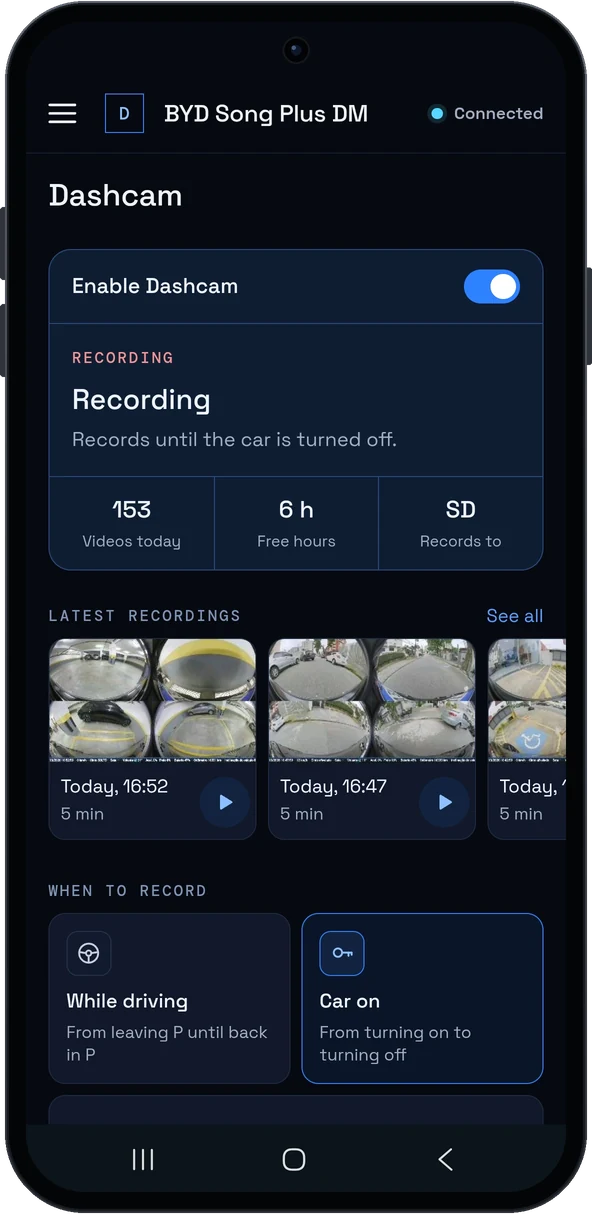
Why it is the most advanced recording
- 4 cameras in one video, in a 2×2 grid like BYD’s four-camera view: front, rear and both sides, in sync.
- USB camera included: plug a webcam into the head unit and it joins the same file, in a strip above the car cameras.
- H.265 when the head unit supports it (smaller files), H.264 otherwise, with at least 24 frames per second per camera.
- Adjustable quality with one simple control, and ready-made defaults if you do not want to change anything.
- Car data in the video, such as speed and time, in the recording’s info strip.
- Record now to keep a specific moment without stopping continuous recording.
- Keeps recording even with the factory camera view open on the head unit (reverse and 360°).
Where videos are stored
- On the head unit, an SD card or a USB drive, organized by year, month and day.
- When space gets close to the limit, the oldest recordings are deleted automatically (you can turn that off), and you can also delete anything older than a number of days.
- DashArc always keeps some free space and, if the chosen card is not in the car, it records to the head unit and lets you know.
Everything on your phone
In the portal’s Recordings menu, each video has a thumbnail, date and length. Tap to watch on your phone, download in the browser or protect the important ones. In Trip history, the video opens right at the chosen moment of the drive. See also recordings on your phone and sentry mode for the parked car.
Pause where you do not need it
Mark safe places, such as your home garage, and choose to pause the dashcam and sentry mode there.
Frequently asked questions
What is the best dashcam for a BYD?
With DashArc, the dashcam is the car itself: all 4 360° cameras recorded into one video, with an optional USB camera, H.265 and recordings on your phone. No dashcam to buy.
Does the dashcam record all 4 cameras at once?
Yes. Front, rear and both sides are recorded together, in sync, into a single 2×2 file.
Does it record audio?
You can record cabin audio along with the video, in the dashcam settings.
Can I use an SD card or USB drive?
Yes. Choose head unit, SD card or USB drive; recordings go to the DashArc/Dashcam folder.
Does my phone need to stay connected?
No. Recording happens on the car’s head unit. Your phone is for watching, downloading and settings whenever you want.
Tested on DiLink 3 head units running the 13.1.33 system family. Not every feature may be available on your vehicle; features depend on the head unit, firmware and model.
DashArc is an independent app. References to BYD, Waze and Android Auto identify the vehicle platform and integrations; they do not imply partnership or endorsement.
More DashArc features
- YouTube, Netflix, WhatsApp and more apps on the BYD head unit — install YouTube, Netflix, Prime Video, WhatsApp, Instagram and any Google Play app from the DashArc store.
- BYD live cameras on your phone — watch the car’s 360° cameras live on your phone, with audio, even while the car is off.
- BYD dashcam and sentry mode — record all four car cameras in a single video, driving or parked, to an SD card, USB drive or the head unit.
- Full BYD telemetry on your phone — 100+ vehicle data points in real time: battery, battery health, fuel, 12 V, tires, power, consumption and more.
- BYD sentry mode — the parked car watched by all 4 cameras, recording to an SD card with the car off and with videos on your phone.
- Dashcam and sentry recordings on your phone — watch, download and protect your BYD videos on your phone, organized by day and linked to each trip.
- Your whole BYD on your phone — car status, live cameras, recordings, commands, telemetry, trips, files and the head unit — all on your phone.
- Start and control your BYD from your phone — start the car and climate, open the trunk, control windows, sunroof, seats and lights from your phone.
- Install apps on the BYD head unit — unlock app installs on the DiLink head unit, use the DashArc store and send APKs from your phone.
- Remote access to the BYD head unit screen — see and control the car’s head unit screen from your phone or computer.
- BYD trip history and telemetry — every trip with a map, distance, real kWh and fuel use, charts and the recordings from that drive.
- Waze on the BYD instrument cluster — Waze turn-by-turn navigation on the display in front of the wheel, with maneuvering cameras and alerts.
- BYD head unit wallpaper (even animated) — change the head unit background to your own photo or an animated video, right from your phone.
- BYD automations — routines that react to the car: triggers, actions, waits and conditions, with BYD cloud commands.
- Extra USB camera on your BYD — plug a webcam into the head unit: watch it live on your phone and record it with the car’s 4 cameras.
- BYD head unit file manager — browse the head unit, SD card and USB drive folders from your phone; upload and download files.
- BYD head unit screen lock and valet mode — protect the head unit with a PIN, password or pattern; valet mode; cameras and A/C stay available.
- Speed camera alerts on the BYD cluster — fixed and red-light speed cameras shown on the instrument cluster, with distance and limit.
- CarPlay on the BYD instrument cluster — Apple CarPlay route on the instrument cluster, automatic iPhone connection and speed camera alerts.
- Android Auto on the BYD instrument cluster — Android Auto route on the instrument cluster, with lanes, turns, exits and speed cameras.
- Maneuvering cameras on the BYD cluster — side camera when you signal and reverse cameras on the instrument cluster, without leaving the route.
- What is the best app for BYD? — DashArc brings a free unlocker, an app store with YouTube and Netflix, live cameras, dashcam, Waze on the cluster and phone control into one app.