WALLPAPER · HEAD UNIT · BYD
Your BYD head unit wallpaper,
your way, even animated.
With DashArc you change your BYD head unit background to any photo or to an animated video that loops on the home screen, picking the file right on your phone.
DashArc uses BYD’s own wallpaper system, so the image fills the whole screen like a factory theme, with no root.
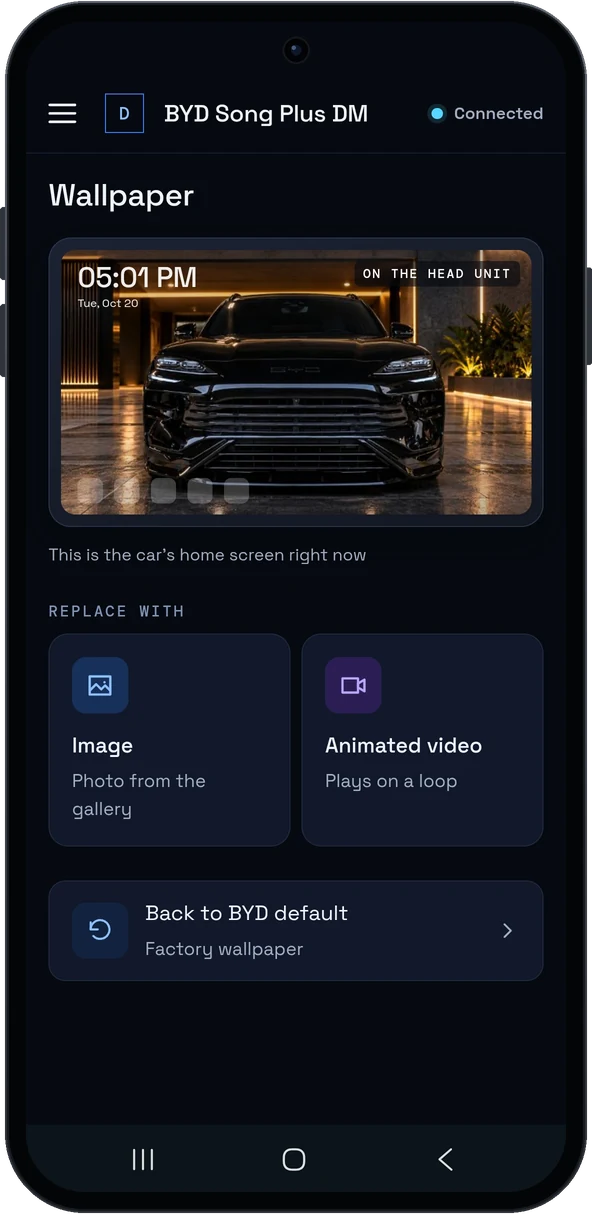
How to change it
- In the DashArc portal, open Wallpaper: it shows the head unit’s current background.
- Pick a photo or video on your phone and check the preview, already cropped for the car screen.
- Tap Apply. The head unit switches the background and DashArc confirms.
Want the original back? Use Restore BYD wallpaper.
Animated wallpaper
MP4 videos (H.264 or H.265) become an animated wallpaper, muted and looping. For best results use 1920×1080, 30 fps and 10 to 30 seconds, with the end blending into the start.
Photos of any size
Landscape or portrait photos are center-cropped and fitted to the head unit screen, with no distortion.
Frequently asked questions
Can I set an animated wallpaper on my BYD?
Yes. DashArc applies an MP4 video as the head unit’s animated wallpaper, looping and muted, using BYD’s own theme system.
Do I need root or a USB stick?
No. Pick the photo or video on your phone and DashArc sends and applies it on the head unit.
Can I go back to the original wallpaper?
Yes, with the Restore BYD wallpaper button.
Tested on DiLink 3 head units running the 13.1.33 system family. Not every feature may be available on your vehicle; features depend on the head unit, firmware and model.
DashArc is an independent app. References to BYD, Waze and Android Auto identify the vehicle platform and integrations; they do not imply partnership or endorsement.
More DashArc features
- YouTube, Netflix, WhatsApp and more apps on the BYD head unit — install YouTube, Netflix, Prime Video, WhatsApp, Instagram and any Google Play app from the DashArc store.
- BYD live cameras on your phone — watch the car’s 360° cameras live on your phone, with audio, even while the car is off.
- BYD dashcam and sentry mode — record all four car cameras in a single video, driving or parked, to an SD card, USB drive or the head unit.
- Full BYD telemetry on your phone — 100+ vehicle data points in real time: battery, battery health, fuel, 12 V, tires, power, consumption and more.
- BYD dashcam: the most advanced recording system — all 4 car cameras (plus a USB camera) in a single video, in H.265, with car data and everything on your phone.
- BYD sentry mode — the parked car watched by all 4 cameras, recording to an SD card with the car off and with videos on your phone.
- Dashcam and sentry recordings on your phone — watch, download and protect your BYD videos on your phone, organized by day and linked to each trip.
- Your whole BYD on your phone — car status, live cameras, recordings, commands, telemetry, trips, files and the head unit — all on your phone.
- Start and control your BYD from your phone — start the car and climate, open the trunk, control windows, sunroof, seats and lights from your phone.
- Install apps on the BYD head unit — unlock app installs on the DiLink head unit, use the DashArc store and send APKs from your phone.
- Remote access to the BYD head unit screen — see and control the car’s head unit screen from your phone or computer.
- BYD trip history and telemetry — every trip with a map, distance, real kWh and fuel use, charts and the recordings from that drive.
- Waze on the BYD instrument cluster — Waze turn-by-turn navigation on the display in front of the wheel, with maneuvering cameras and alerts.
- BYD automations — routines that react to the car: triggers, actions, waits and conditions, with BYD cloud commands.
- Extra USB camera on your BYD — plug a webcam into the head unit: watch it live on your phone and record it with the car’s 4 cameras.
- BYD head unit file manager — browse the head unit, SD card and USB drive folders from your phone; upload and download files.
- BYD head unit screen lock and valet mode — protect the head unit with a PIN, password or pattern; valet mode; cameras and A/C stay available.
- Speed camera alerts on the BYD cluster — fixed and red-light speed cameras shown on the instrument cluster, with distance and limit.
- CarPlay on the BYD instrument cluster — Apple CarPlay route on the instrument cluster, automatic iPhone connection and speed camera alerts.
- Android Auto on the BYD instrument cluster — Android Auto route on the instrument cluster, with lanes, turns, exits and speed cameras.
- Maneuvering cameras on the BYD cluster — side camera when you signal and reverse cameras on the instrument cluster, without leaving the route.
- What is the best app for BYD? — DashArc brings a free unlocker, an app store with YouTube and Netflix, live cameras, dashcam, Waze on the cluster and phone control into one app.